
What a HubSpot CRM Cleanup Actually Finds: A Teardown of a Portal Nobody Believed
Forty contacts, ten companies, an empty Deals object — and the decisions that never show up in the finished screenshots.

One contact in Brightline Consulting's HubSpot portal was a customer and an unqualified lead at the same time.
Same person. Two records. Two lifecycle stages, both feeding the same reports, neither flagged to anyone. And neither record was wrong when it was created — each was entered by someone doing their job properly on the day they did it.
That's the part that gets misjudged. CRM cleanup gets budgeted as tidying — something a diligent admin could knock out in a quiet fortnight. What you're buying is a set of decisions nobody made the first time: which record survives, what a pipeline stage means, who owns a field.
What follows is a teardown of that portal — the audit findings, the screenshots behind them, and the routine that stopped it repeating. The engagement: a full HubSpot CRM Data Audit & Cleanup for a professional services firm.
Three sources, no standard, and a column full of "No owner"
The database had accumulated over several years from spreadsheets, trade show attendee lists and referral databases. Three intake routes, three sets of habits, no validation between them.
Run that long enough and you don't get bad data. You get inconsistent data, which is harder, because it still looks usable.
The audit surfaced what neglected portals always surface. Names in three capitalisation styles. Phone numbers in several formats. Job Title and Lead Status blank across a large share of records.
Then there's the column I check before anything else.

Before the HubSpot CRM cleanup — every row in the contact database reads "No owner." Without ownership, nobody is accountable for record accuracy and every data standard becomes optional.
Read down Contact owner. Every row says "No owner." Not most rows.
Ownership is the load-bearing property in any CRM, and it has almost nothing to do with commission. It's an accountability mechanism.
A record with an owner has someone who notices the phone number is wrong; a record without one has nobody positioned to catch anything. Every data standard becomes advisory the moment ownership goes missing.
What a HubSpot CRM audit is actually looking for
Open a portal in this state and the pull is to start fixing. Correct a name. Merge an obvious duplicate.
It feels productive, and it's the most expensive habit available to you: change things in an undocumented order and the baseline disappears, along with any way of telling an error apart from context somebody depends on.
So the first pass edits nothing. It records.
What a HubSpot CRM audit should check
-
Duplicate contacts and companies, including near-matches that share no identical field
-
Formatting consistency across names, phone numbers, company names and email domains
-
Record completeness — which fields are actually populated, not which ones exist
-
Ownership coverage across contacts, companies and deals
-
Associations between objects: contacts to companies, deals to both
-
Lifecycle Stage and Lead Status accuracy against real customer status
-
Whether a functioning sales pipeline exists at all
Contacts get the attention. Companies are reliably the worse half, because nobody is accountable for them day to day.

The company database was in worse shape than the contacts: duplicate organisations one letter apart, a company name entered as an email address, and industry values with no relationship to the businesses attached to them.
The same organisation under multiple spellings, one letter apart. A company name entered as an email address. Phone Number and City empty down the entire view. An Industry column carrying Alternative Medicine, Mobile Games, Airlines/Aviation.
Those industry values are the ones I'd raise first, because they're invisible. Untidy names announce themselves; a wrong industry looks like clean data while it poisons a segment, a list, a campaign.
The duplicate contacts that broke every lifecycle report
HubSpot's Data Quality tools will hand you a list of likely duplicate pairs. Useful. Also not the work.

HubSpot's Data Quality tools surface likely duplicate contacts. The decision stays with you — which record survives, which values carry across, and what happens to the associations on the one you retire.
Four pairs surfaced here. The tool is confident about matching and silent about everything after it: which record survives, which values carry across, what happens to the associations on the one you retire.
Merging isn't the reversible operation people assume — a three-second decision, inherited permanently by your reporting.
Two of them fail differently.
Exhibit A: one person, two lifecycle stages

Duplicate record A — Lifecycle Stage Customer, Lead Status Open, phone number present, company association intact.

Duplicate record B — the same person on a mistyped email domain, listed as CEO, with no phone number, no company association and a Lifecycle Stage of Lead. Both records were true at once, so every lifecycle report counted her twice.
Record one: Finance Director, Lifecycle Stage Customer, Lead Status Open, phone number present, company association intact. Record two: same individual on a domain one typo from the real one, listed as CEO, no phone number, no company association, Lifecycle Stage Lead, Lead Status Unqualified. Both unowned.
As far as HubSpot was concerned, both were true at once.
Follow that downstream. Contacts by Lifecycle Stage counts her twice, in contradictory buckets. A nurture sequence built on the Lead segment sends prospecting email to an existing customer. A rep opening the second record finds no history and calls her as though she's new.
One duplicate is an irritation. A few percent duplication makes lifecycle reporting worthless — and worthless reporting is how teams quietly abandon a CRM. Nobody announces they've stopped trusting the numbers. They start keeping their own spreadsheet.
Exhibit B: the record no dedupe rule catches

The duplicate no automated rule catches — a corrupted display name, a company rendered as "BleU Peakk," an email one letter transposition from the real address, and a Lifecycle Stage of Evangelist on a record with no activity at all.
Read this one slowly. First name stored as "HenrY King". The surname repeated into the display name. The company beside the job title rendered as "BleU Peakk".
An email one letter transposition from the real address. Lifecycle Stage: Evangelist — on a record with no activities, no deals, no company and no owner.
Nothing matches anything, which is why automated deduplication walks past it: exact-match logic needs a shared field to anchor to, and this record shares a phone number with its twin and a human being.
If your process is "HubSpot flags them, we merge them," this one lives in the database indefinitely.
My rule on every merge: keep the record with the strongest associations and activity history, then carry the correct values onto it. Decide what survives before you press merge.
Formatting drift, and why standardising HubSpot data starts with a decision
Duplicates are the dramatic finding. Formatting drift is the one that ruins the CRM day to day.

Formatting drift, itemised. HubSpot proposes a fix for each capitalisation and punctuation issue — including a first name stored as "Chloe " with the quotation marks intact. The tool proposes; you still define the standard.
Capitalisation and punctuation problems, each with a proposed fix — including a first name stored as "Chloe ", quotation marks and trailing space intact. No deal has been lost to a lowercase surname; together they're why a search returns nothing and a filtered list is missing four records.
HubSpot proposes the corrections. It cannot decide your standard, and that has to exist in writing before cleanup starts — otherwise you're applying the tool's suggestions with no rule anyone can follow next month.
The standards are deliberately unremarkable:
-
Proper capitalisation on first and last names
-
Business email addresses wherever available
-
One consistent phone number format
-
The official registered company name, not a trading variation
-
Deal names formatted as "Company – Project or Initiative"
-
An owner assigned to every record, without exception

The same contact view after the cleanup — 40 standardised records, an owner on every row, one phone format, company associations, and complete Lifecycle Stage and Lead Status coverage.
Same view as the first screenshot, after the work: 40 standardised records, an owner on every row, one phone format, company associations, complete Lifecycle Stage and Lead Status coverage, and ten consolidated companies behind them.
An empty Deals object, and the pipeline built to replace it
Now the finding that reframed the engagement.
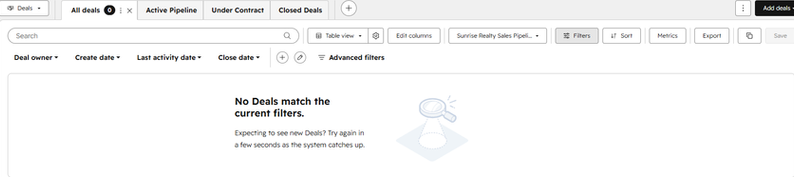
No deals, no stages, no forecast. Before the pipeline was built, the portal could describe who the business knew but nothing about what it was working on.
No deals. Not few — none. Several years of contact history, and the portal couldn't say what the business was working on or expected to close.
An address book with reporting features bolted on.
A seven-stage sales pipeline was configured around how the firm sells, each stage carrying a win probability and an entry condition:
-
New Inquiry (10%) — a new opportunity has been identified
-
Initial Contact (25%) — first outreach has been completed
-
Discovery Scheduled (45%) — a discovery meeting is arranged
-
Proposal Sent (65%) — a proposal has been delivered to the prospect
-
Negotiation (90%) — commercial discussions are underway
-
Closed Won / Closed Lost — the opportunity has converted, or ended

The seven-stage sales pipeline, from New Inquiry (10%) through Negotiation (90%). Each stage carries an entry condition tied to an observable event rather than rep sentiment.
Every condition describes something that either happened or didn't — Discovery Scheduled means a meeting exists in a calendar. That constraint carries more weight than the probabilities do. Stages defined by how a rep feels produce a forecast that's sentiment with a percentage stapled to it.
Forty deals were then built out and associated with both a company and a contact. One rule went into the handover ahead of everything else: every deal links to both. A deal tied to one object doesn't report correctly, so the forecast quietly understates itself — and conservative numbers never get challenged.
Saved views: the cheapest CRM adoption fix there is
Low CRM adoption gets diagnosed as a training problem more often than it deserves. If answering "what am I working on today" costs four filters and a sort, a competent salesperson rebuilds that answer somewhere faster, and the CRM becomes downstream of reality.
Nine saved views shipped with this portal: deal views separating open, closed won and closed lost; contact views for customers and pre-customer lifecycle stages; a company view surfacing only accounts with active deals.

A saved view for open deals — 22 opportunities with stage, amount, close date, owner and both associations in a single click. Saved views buy more CRM adoption than training does.
One click gives the picture — 22 open opportunities with stage, amount, close date, owner, and both associated company and contact on the same row.
Views improve the underlying data by nothing at all. They shorten the distance between a question and its answer, which decides whether anyone opens HubSpot.
Eight reports, built only once the data could carry them
Reporting is where clients want to start. It comes last: a dashboard built on inconsistent data doesn't expose the inconsistency, it formats it.
With the structure sound, eight reports went onto one dashboard — revenue forecast by stage, monthly closed revenue, deals by stage, contacts by Lifecycle Stage, contacts by Lead Status, contacts by original import source, and total companies.

Revenue forecast by stage and monthly closed revenue on one dashboard — pipeline expectation and delivered business drawn from live CRM data rather than a hand-maintained spreadsheet.
Forecast left, realised revenue right — from live CRM data rather than a hand-maintained spreadsheet.
The step most cleanups quietly destroy
One decision here is worth stealing whatever state your portal is in, and it happened before a single record was edited.
A custom property — Original Import Source — captured where each contact originally came from. Old spreadsheet. Trade show. Referral sheet.

The custom Original Import Source property, created before any record was edited, preserved where every contact came from — 14 from an old spreadsheet, 13 from trade shows, 13 from a referral sheet. Most cleanups erase that history permanently.
Fourteen, thirteen and thirteen. Standardise without capturing that first and it's gone: you can clean every record beautifully while erasing the only evidence of which acquisition channels produced which part of your customer base. Here it became a permanent reporting dimension.
What keeps a HubSpot CRM clean after the consultant leaves
A cleanup is an event with an end date. Data quality is a habit, and habits need names attached.
Three owners, three different jobs
Sales own their records: deal stages, Lead Status, logged activity, and closing opportunities promptly instead of leaving them open because closing feels final.
Managers own the review — a weekly pass over pipeline movement and forecast accuracy. The admin owns the system: imports, properties, duplicate monitoring, periodic audits.
Divided this way nobody carries a heavy job. Unassigned, all three default to nobody — the state this portal started in.
The monthly health check
Ten to fifteen minutes a month. Duplicate contacts and duplicate companies.
Missing phone numbers, and contacts with no associated company. Lifecycle Stage and Lead Status consistency. Deal ownership, recent imports, the dashboard.
That's the routine. It isn't clever. I've watched it prevent second cleanup projects at clients where more sophisticated governance went unopened.
The eight habits that undo the work
Degraded portals show the same behaviours: creating a new contact instead of searching first, creating companies under slightly different names, leaving Lead Status blank, forgetting to associate deals with contacts, skipping pipeline stages, closing deals without recording values, importing spreadsheets without reviewing formatting, and letting naming conventions drift between users.
None is a mistake made once. They're patterns — individually harmless, collectively responsible for every screenshot in the first half of this article. Which is why the countermeasure is a standard and a routine.
What I'd take from this project into yours
-
Document the portal's original state first. Without a baseline you can't prioritise or tell context apart from error.
-
Duplicates damage reporting before they damage data, and the worst share no fields at all — human review, not matching rules.
-
Write the data standard down before cleaning, or you're just distributing the tool's suggestions.
-
Pipeline stages need entry conditions tied to observable events. Anything else is sentiment with a probability attached.
-
Adoption follows friction. Saved views buy more of it than training does.
-
Build reporting last, and capture data provenance before you standardise it away.
-
Fifteen minutes a month is what makes the cleanup permanent.
The cleanup is the easy half
Everything here was recoverable. Duplicates merge. Formatting standardises. A pipeline can be configured in an afternoon. Holding that state is the harder discipline — and the useful question isn't whether your HubSpot CRM can be cleaned, but whether it will still match how you operate in two years.
That gap is where most of my work sits. Growing businesses rarely need HubSpot set up again; they need it maintained and improved as the way they sell changes, which is a different engagement from an implementation.
If your reports have stopped being believed, or HubSpot has drifted from how the business genuinely runs, you can read more about building a HubSpot CRM your business can rely on to, or if you'd rather have someone do the HubSpot CRM and sales ops work that needs to be done in order to scale for you...

.png)