
The Hidden Ten-Minute HubSpot CRM Decision That Slowly Destroys Your Data Quality
The damage doesn't happen during implementation... it happens in the months that follow. Learn the structural decisions that keep your HubSpot CRM accurate long after launch.

The most expensive field in a HubSpot portal is a plain text box.
Not the deal pipeline. Not the forecast. A single text input somebody added on a Tuesday afternoon because a dropdown felt restrictive — quietly deleting a reporting dimension the business would come looking for two years later.
Nobody writes that decision down. There's no changelog entry reading today we made next year's board report impossible.
So the call, when it comes, arrives in disguise: can you fix our reports?
I've stopped answering that one directly. Reports don't invent anything. They summarise, faithfully and without mercy, whatever the records beneath them say. When the dashboard and the sales team disagree, one of them is describing a process that isn't happening the same way twice — and it isn't the dashboard.
So rather than argue it in the abstract, I want to take a build apart in public. The subject is a website-to-HubSpot implementation I put together for Ironclad Auto Detailing, a mobile auto detailing business — a reference build, documented end to end, screenshot by screenshot. Every claim below has a picture attached to it.
Follow a broken number backwards and it stops at the form
Diagnostics on messy portals turn up the same four fingerprints, in various combinations:
-
The enquiry never became a record. It arrived as email, got answered, stayed in an inbox — technically handled, permanently uncountable.
-
Somebody typed the important part. "Wants the full package, has an SUV," pasted into a note. Clear to a human. Invisible to every report you'll ever run.
-
Follow-up ran on memory. Nothing required the next action, so consistency tracked how busy that week happened to be.
-
Two people created two records two different ways. Same day, same source, different owner and lifecycle stage, because nothing decided it for them.
None of these announce themselves, which is what makes them expensive. Each is survivable in month one and structural by month eighteen — at which point you aren't fixing a report, you're doing archaeology on a year and a half of records that were each built slightly differently.
Here's the bar I work to. A CRM is reliable when the same question, asked twice, returns the same answer — and that only happens when every record in it was created the same way.
The four questions that earned a place on the form
Most lead capture forms get designed around what's convenient to ask. Better ones get designed backwards, from the decisions someone has to make once the enquiry lands.
For Ironclad, four things had to be known before anyone picked up the phone: which service, what vehicle, when they wanted it, and whether anything about the job was unusual. Those four questions became four custom contact properties.
A field that changed no decision didn't ship. The published form runs to eight fields — standard contact details plus those four business-specific ones — with Google reCAPTCHA on spam and a plain-English consent notice underneath.

The published lead capture form — eight fields total, four of them custom contact properties, with reCAPTCHA and consent wording handled inside HubSpot rather than bolted on.
Count them yourself. Eight wasn't a target — it's what survived once every field had to name the decision it informed.
Why two dropdowns were worth more than any report I could have built
Service Requested and Vehicle Type were built as dropdown selects. Preferred Appointment Date is a date picker. Additional Service Notes is the only free-text field on the form, deliberately — the place everything that doesn't fit a field is allowed to go.
Ten minutes of decisions, maybe less. Consider what they bought. Dropdown values can be filtered, segmented, counted, charted and enrolled into automation.
Typed text can be read by a person and nothing else. "Ceramic coating on a pickup" and a stored value of Ceramic Coating mean the same thing to your team and completely different things to your dashboard.
The four properties also went into a dedicated property group rather than scattered through HubSpot's defaults.

Four custom contact properties — two dropdown selects, a date picker and one multi-line text field — grouped deliberately instead of scattered through HubSpot's defaults. Fill rate shown across a five-submission test set.
That grouping looks like housekeeping. It's closer to insurance.
Portals become unmanageable by year three through property sprawl — dozens of custom fields created in a rush, named to no convention, owned by nobody, half of them near-duplicates with slightly different picklists. A property group is where you decide that won't happen to you.
One caveat I'd rather state than have you infer: the 100% fill rate in that screenshot comes from a five-submission test set, not production. It confirms the fields are wired correctly. It says nothing about fill rate at 200 enquiries a month.
The first hour is where leads actually die
Capture is the easy half. Ask anyone who's watched a perfectly good enquiry sit unread until Thursday.
One workflow handles the handoff, enrolling any contact who submits the quote request form and running four steps.

The lead handoff workflow, trigger through step four. The five-minute delay exists so contact ownership resolves before the task and internal notification fire.
Read the sequence in order: confirmation email to the customer immediately, five-minute delay, follow-up task created and assigned to the contact owner, internal notification out.
That delay is the part worth stealing. It splits the customer-facing action, which should be instant, from the internal ones, which need contact ownership to have resolved first. Skip it and you'll eventually generate tasks against an empty owner field.
Unassigned tasks are how enquiries disappear. Not dramatically — they sit in a queue belonging to no one.
Why the notification and the task are not redundant
Plenty of implementations send the notification and call the job done. That buys awareness, which isn't the same currency as accountability.
An email is one line in a busy inbox, competing with everything else that landed at 9:14am. A task carries an owner, a due date and a queue that can be reviewed, escalated and reported on.
Running both is deliberate belt-and-braces: the email gets attention now, the task keeps the enquiry visibly outstanding until someone marks it done.
I threw out HubSpot's default notification. Here's what it was costing
HubSpot's built-in form submission notification works. Look at what it asks of the reader though — every field weighted identically, in submission order, on a phone, between jobs.

Before — HubSpot's default form submission notification. It works, but every field carries identical visual weight, which makes it slow to scan on a phone.
The replacement uses personalisation tokens to lead with the four details that determine the next action — service, vehicle, date, notes — and closes on the internal standard: review the contact record and respond within one business day.

After — a custom internal notification built with personalisation tokens, leading with service, vehicle, date and notes, and closing on the one-business-day response standard.
That closing line does more work than the layout. A response standard living in someone's head is a preference. Printed at the bottom of every notification, it becomes an operating instruction that survives staff turnover and busy weeks.
Adoption is a legibility problem in disguise
Teams don't abandon a CRM because they dislike CRMs. They abandon systems that make them open five records to answer one question.
So the contact view was customised to put the business-relevant columns straight into the table: service requested, vehicle type, preferred appointment date, lifecycle stage and contact owner.

The contact view configured for how the business actually works — a week of enquiries can be triaged, prioritised and checked for unassigned records without opening a single contact.
A week's enquiries can now be triaged from the list view. Upcoming appointments are visible without a click. Anything unassigned stands out immediately. Five minutes of configuration that will outperform your next training session.
The timeline is the only witness you'll have
Every contact record captures the sequence on its own — page view, contact created, lifecycle stage moving to Lead, confirmation email sent, form submission logged, follow-up task scheduled.

The full automated sequence captured on the contact record. When a workflow eventually stops firing, this timeline is what tells you which step failed and when.
Automation breaks eventually, usually after somebody edits a form field or clones a workflow. When it does, the timeline is the only thing that will tell you which step stopped firing and when, instead of leaving you to guess and rebuild the chain.
Reports don't test your reporting. They test your data model.
Three reports sit on the dashboard: contacts by service requested, contacts by lifecycle stage, and form submission tracking.

Reporting built on structured properties rather than free text. The service breakdown is only possible because Service Requested was configured as a dropdown at the form stage.
None took cleverness to build. The service breakdown exists because Service Requested is a dropdown instead of a note; the lifecycle chart exists because stage is set by automation instead of by whoever remembers.
Try it on your own portal. Pick a report your team genuinely needs and attempt to build it. If you can't, the fault sits upstream in the data model — and forcing it at the reporting layer hands you a number nobody trusts by quarter end.
Five submissions, and what they could and couldn't prove
Before go-live the build went through five end-to-end test submissions. Every one created a new contact. None overwrote an existing record. Zero spam got through the reCAPTCHA. Every field was completed, optional ones included.
The confirmation email was opened in a real inbox rather than assumed to have sent.
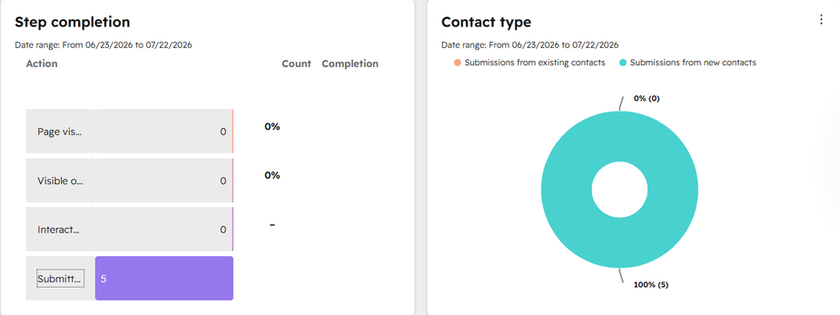
End-to-end testing before go-live: five submissions, zero spam, every one creating a new contact with no existing records overwritten. A functional test, not a volume benchmark.
Now the honest part, since case studies tend to inflate around here.
Five submissions is a functional test, not a performance benchmark. It proves the plumbing holds and the automation fires in the right order.
It can't tell you how the system behaves at fifty enquiries a week — which is precisely why reviewing doesn't stop at handover.
Where builds like this rot
The implementation is rarely what fails. The six months after it are. Recurring causes, in rough order of frequency:
-
Properties added without a home. New fields created under pressure, never grouped, never named to a convention, never documented.
-
Automation added without ownership rules. Each new workflow quietly assumes owner assignment works. One day it doesn't.
-
Free text where a dropdown belongs. Somebody finds the picklist restrictive, swaps in a text field, and a reporting dimension leaves with it.
-
Go-live treated as the finish line. Nothing gets reviewed again until the numbers are wrong in front of other people.
-
No named owner. A CRM belonging to everyone belongs to nobody, and drifts accordingly.
The unglamorous part that keeps HubSpot reliable
Two habits, neither of them technically demanding.
The first is a review that fits inside a coffee break. For Ironclad, five to ten minutes a week: clear outstanding follow-up tasks, check new enquiries, confirm customer information is complete, scan for duplicates, review the dashboard, confirm everything has actually been contacted. Deeply boring. It catches drift while drift is still cheap.
The second is architectural. Deal pipelines, appointment scheduling, nurture campaigns and service reminders can all be layered onto the existing property group, active list and lifecycle structure without touching what's already running.
When the next capability requires tearing something down, that's not a growth problem — it's a decision made badly at implementation.
Which is the line I'd draw for anyone choosing who to work with. Standing HubSpot up is a project, and projects end. Keeping it accurate while the business underneath changes shape is a discipline, and disciplines don't.
Questions I get asked on the first call
Why do HubSpot reports stop matching reality? Because the records were built inconsistently — different owners, different stages, key details typed into notes instead of properties. The report is doing its job perfectly, summarising a process that varies. The variation surfaces as a number nobody recognises.
Should I use custom properties or notes? Anything you might one day filter, segment or count belongs in a property. Notes are for context a human reads. The test takes a second: would you ever want to know how many?
How many fields should a lead capture form have? As many as change a decision, and no more. Eight worked here because four captured contact details and four drove the quote. Fields beyond that lower completion and leave you maintaining data nobody uses.
Does any of this apply to a bigger sales team? The principles transfer unchanged; the consequences scale. With one owner, inconsistent intake is an annoyance. With eight reps, it's why the forecast is wrong and nobody can explain it.
What I'd take from this build
-
Reporting problems are almost always intake problems with a long fuse.
-
Structured properties make reporting possible; free text makes it impossible, and the swap takes ten minutes.
-
Group custom properties from day one — sprawl makes portals unmanageable, not volume.
-
Pair notifications with tasks. One creates awareness, the other accountability. They aren't substitutes.
-
Test end to end as a customer, then describe your sample size honestly.
-
Build so the next capability goes on top rather than through the middle.
If your portal has drifted from how the business actually runs today — reports you quietly double-check, pipelines that don't reflect what's happening, a structure built for a company you've outgrown — that's usually an architecture problem with a fix, not a reason to start again.
For more on how I help growing businesses keep HubSpot reliable and scalable, click below.

