
The Biggest Difference Between a HubSpot CRM That Lasts and One That Slowly Falls Apart
Build your CRM around the systems, standards and ownership rules that keep it working as your business evolves.

Most HubSpot problems are not feature problems.
The portal has the tools. What breaks is the relationship between the CRM and the business it was built for. Reports stop matching what the sales team knows to be true.
Pipelines fill with deals nobody has touched in months. Reps keep the real detail in their heads, their notebooks, or a private spreadsheet. Someone eventually asks for a forecast and nobody quite trusts the number that comes back.
That drift is predictable, and it is preventable. This article breaks down the architecture decisions that keep a HubSpot CRM accurate as a company grows: how to structure data, capture it, model your pipeline, automate the maintenance, and report on it in a way that surfaces problems early.
To keep it concrete, I'll use screenshots from a complete HubSpot implementation I built end to end — a reference build for a three-agent real estate brokerage, Sunrise Realty Group, configured in a live portal with 37 contact records, 24 deals, a custom property framework, an executive dashboard and a full automation layer.
Why HubSpot becomes unreliable as a business grows
CRM reliability is the degree to which you can act on what the CRM tells you without checking it against something else. A reliable CRM produces reports you'd take into a board meeting. An unreliable one produces reports you'd verify first.
Portals rarely fail all at once. They degrade, usually for three reasons.
The data model was never designed around the sales process. The CRM was configured to match HubSpot's defaults rather than how the business actually qualifies and progresses opportunities, so the important information ends up in note fields where nothing can report on it.
Maintenance depends on people remembering. Lifecycle stages, owner assignment, follow-up tasks and record hygiene all rely on manual discipline. Discipline holds at five deals a month. It does not hold at fifty.
Reporting sits on fields nobody is required to complete. A dashboard is only ever as accurate as its least-consistently-populated property.
None of these are fixed by buying more HubSpot. They're fixed by design.
Start with the data model, not the features
Before importing a single record, decide what your business needs to know about every contact and every deal — then build properties for exactly that.
In the brokerage build, five custom contact properties carry the qualification logic — Property
Interest, Preferred Area, Budget Range, Purchase Timeframe and Lead Priority — held in a single custom property group so agents see the business-critical fields together rather than hunting through HubSpot's defaults.
HubSpot's standard Lifecycle Stage property sits alongside them, maintained by the automation layer rather than by hand.

Custom contact properties in HubSpot — Budget Range, Lead Priority, Preferred Area, Property Interest and Purchase Timeframe — grouped together as dropdown fields. The fill rate column confirms every property is populated across the database.
Two design choices matter more than the field names.
Use structured values, not free text. Every qualification field is a dropdown with defined options. Free text is fine for humans and useless for machines: you cannot segment, automate or report on eleven different spellings of "downtown".
Populate them consistently across the whole database, not just new records. Contacts were imported with qualification data intact, associated with deals, and distributed across lifecycle stages so the reporting reflected an operating CRM rather than an empty shell.
Note the fill rate column in the screenshot above: 100% on all five. That column is the single most useful diagnostic in HubSpot's property manager, and almost nobody looks at it. A property populated on 60% of records produces a report that is right about 60% of your business.

Structured qualification data applied consistently across the whole contact database, not just new records — the foundation of reliable HubSpot CRM reporting.
A useful test for your own portal: pick the three questions your leadership team asks most often about the sales pipeline. If answering any of them requires opening individual records and reading notes, that answer belongs in a property.
Capture qualification data at the point of entry
The cheapest moment to collect structured data is the moment a lead arrives. Every later attempt costs someone a phone call and a manual update.
The brokerage's website enquiry form asks only for what an agent genuinely needs before the first conversation — contact details plus property interest, preferred area, purchase timeframe and budget range — and writes those answers directly into the same custom properties the CRM reports on.
No re-keying, no interpretation, no gap between what the prospect said and what the CRM holds.

The website enquiry form writes qualification answers directly into the CRM's custom properties, removing manual re-keying and enforcing data quality at the point of entry.
Submission also triggers a confirmation page and a branded confirmation email that sets a clear expectation: an agent will respond within one business day.

The automated confirmation email sets a clear response expectation, creating a professional first impression while committing the business to a standard the CRM can enforce through task automation.
That email does two jobs. It creates a professional first impression at the moment interest is highest, and it commits the business to a response standard the CRM can then enforce through task automation. The form is not just a lead capture mechanism — it's where data quality is decided.
Design the pipeline around milestones, not activity
A pipeline stage should describe something that has verifiably happened, not something a rep is busy doing. "Following up" is not a stage. It's a state of mind, and deals sit in it indefinitely.
The brokerage pipeline uses seven stages, each mapped to a real milestone in the transaction and each carrying a weighted close probability: New Inquiry (10%), Initial Contact (25%), Consultation Scheduled (45%), Property Search / Listing (65%), Under Contract (90%), then Closed Won (100%) or Closed Lost (0%).

A seven-stage HubSpot sales pipeline built around verifiable milestones, each carrying a weighted close probability — the setting that turns a list of open deals into a usable revenue forecast.
Those weightings are what turn a list of open deals into a revenue forecast. They only work if stages mean the same thing to everyone, which is why each stage needs a written definition the team can point at — an entry condition, not a vibe.
Filtered deal views do the other half of the job. Separate saved views for the active pipeline, deals under contract and closed business mean a rep opens HubSpot and sees their current work rather than the entire database.

A saved, filtered deal view limits the screen to live opportunities. Reducing irrelevant data is one of the most underrated drivers of CRM adoption and long-term data quality.
Adoption is largely a function of how much irrelevant information you make people scroll past. Reducing that is unglamorous work with an outsized effect on data quality, because a CRM people avoid is a CRM that goes stale.
Automate maintenance, not just outreach
Most teams automate the marketing layer — emails, nurture sequences, notifications. Reliability comes from automating the record maintenance underneath it: the updates that keep the data true while people get on with selling.
The automation strategy in this build targeted five scenarios: processing new website enquiries consistently, keeping lifecycle stages synchronised with deal progression, identifying high-value opportunities automatically, preventing opportunities from going stale, and ensuring closed-lost deals are reviewed for future re-engagement.

The automation layer behind the CRM — live HubSpot workflows handling enquiry processing, lifecycle synchronisation, lead prioritisation and pipeline hygiene, with enrolment counts confirming they are running in production.
Keep lifecycle stages synchronised with deal progression
Inconsistent lifecycle data is one of the most common causes of unreliable CRM reporting, because it's maintained in two places by people who are measured on something else entirely.
The fix is to make deal progression the single source of truth. This workflow branches on deal stage and updates the associated contact's lifecycle stage automatically — so a rep moves the deal, and the contact-level reporting updates itself.

Deal progression drives lifecycle stage updates automatically. One action in one place removes the duplicate data entry that causes most unreliable HubSpot reporting.
One action, one place, no duplicate work. That principle generalises: any time the same fact has to be recorded twice, expect the two records to diverge.
Encode your prioritisation rules in the CRM
Every business has an internal rule about which enquiries get attention first. Usually it lives in the sales manager's head.
Here it's explicit: contacts whose Budget Range falls in the top two brackets are automatically set to High lead priority, and the contact owner is notified. The rule is applied identically to every record, at any hour, whether or not anyone is watching.

A business rule encoded directly into HubSpot: premium-budget enquiries are flagged High priority and the contact owner is notified — applied identically to every record, without relying on anyone to remember.
This is the payoff from structured properties. Because budget was captured as a defined value at form submission rather than typed into a note, a business rule can act on it.
Surface what's going quiet
Deals rarely die from rejection. They die from silence.
A stale deal workflow monitors opportunities sitting in active stages without recent progress and creates a follow-up task for the owner. A parallel process sets a future review task on closed-lost deals, so opportunities that weren't right this quarter remain visible rather than disappearing.
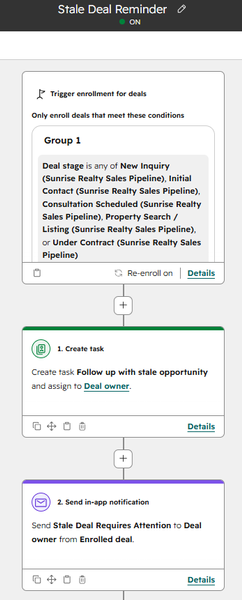
Pipeline hygiene running as background infrastructure. Opportunities that go quiet in active stages generate a follow-up task automatically, instead of waiting for a manager's weekly chase.
Both are pipeline hygiene running as background infrastructure instead of as a manager's weekly chase.
Report on decisions, not activity
A dashboard earns its place when it changes what someone does that week. The executive dashboard here runs five reports: Deals by Stage, Revenue Forecast, Contacts by Lifecycle Stage,
Monthly Closed Revenue and Lead Priority Distribution — pipeline shape, expected revenue, journey progression, delivered results and where attention should go.

Pipeline distribution and forecasted revenue side by side on the executive dashboard — reporting built to support sales decisions rather than to fill a screen.
The most useful reports do double duty as data-quality instruments. Lead Priority Distribution across the 37 contacts shows 32.43% High (12), 10.81% Medium (4) and 56.76% Low (21).
Demand by service line comes free with the capture design. Separate forms plus hidden-field categorisation produce reliable lead source attribution without additional tracking.

Lead Priority Distribution across the CRM database. Read as a business signal it shows the share of premium-value enquiries; read as a data signal it tells you whether Budget Range is still being captured properly.
Read that as a business signal and it tells you roughly a third of the database is premium-value. Read it as a data signal and it tells you something more valuable: the split is only meaningful if Budget Range is being captured properly.
If a distribution like this suddenly shifts, the first question isn't "what changed in the market" — it's "what changed about how we're collecting the input". That's the habit that separates a CRM you trust from one you audit.
Treat handover and documentation as part of the build
A CRM that only its architect understands has a single point of failure.
The brokerage implementation shipped with an operational guide covering the five-step workflow every rep follows on a new enquiry, what each custom field means, which fields are maintained automatically, what each report answers, and five rules for keeping the CRM healthy as the database grows:
-
Never create duplicate contacts — always search before creating a record.
-
Progress deals, not contacts — the automations are built around deal progression.
-
Complete follow-up tasks promptly rather than deleting them.
-
Keep structured properties accurate; use the fields, not just the notes.
-
Review the dashboard weekly, while small issues are still small.
"Progress deals, not contacts" is the line that does the most work. It tells a rep exactly which single action keeps the rest of the system accurate, and it's the kind of instruction that survives staff turnover.
Common mistakes that quietly break a HubSpot portal
-
Configuring features before mapping the process. Every workflow you build on a flawed data model has to be rebuilt later.
-
Storing qualification detail in notes. If it can't be reported on or automated against, it isn't CRM data.
-
Naming pipeline stages after activity. Unverifiable stages produce unreliable forecasts.
-
Automating only outbound communication. The maintenance layer is what protects data quality.
-
Building dashboards nobody reviews on a schedule. Reports catch problems only if someone reads them.
-
Treating go-live as the finish line. The business keeps changing; a CRM that doesn't change with it drifts out of alignment within a year or two.
Key takeaways
-
Reliability is an architecture outcome, not a training outcome.
-
Structured properties are the foundation — automation and reporting are downstream of them.
-
Capture data where it's cheapest: at the point of entry.
-
Pipeline stages must describe verifiable milestones if forecasts are to mean anything.
-
Automate the record maintenance, not just the messaging.
-
Documentation and weekly review are what keep all of the above true six months later.
Where this leaves you
Growing businesses rarely need a new CRM. They need the one they have to keep matching how they now operate — which means periodically revisiting the data model, retiring workflows built for a smaller version of the company, and tightening the reporting layer as decisions get more expensive.
If your HubSpot portal is starting to drift — reports you double-check, pipelines that don't reflect reality, adoption slipping as the team grows — that's a solvable architecture problem, not a discipline problem.
You can read more about how I help growing businesses keep HubSpot reliable and scalable here.

.png)