
Build Your HubSpot CRM Once. Stop Rebuilding It Every Year.
Discover the implementation decisions that prevent technical debt, inconsistent data and broken processes as your company scales.

Most HubSpot CRMs don't fail at launch. They fail about fourteen months later when the pipeline has stages nobody uses, three properties mean roughly the same thing, half the open deals have a close date from last quarter, and the sales director has quietly gone back to a spreadsheet because the forecast can't be trusted.
That decay is rarely a HubSpot problem. It's a design problem, and most of it is decided during implementation, in choices that look cosmetic at the time and become expensive later.
This article works through those choices using a real build: a HubSpot CRM implemented for Anchor Point Insurance Brokerage, which had been running its sales process across spreadsheets, email threads and manual follow-up.
The examples are insurance-specific; the decisions apply to any business with a sales cycle worth managing.
What a HubSpot CRM implementation actually involves
A HubSpot CRM implementation is the work of configuring HubSpot around a specific sales process rather than accepting its defaults. In practice it spans six layers, and each depends on the one beneath it:
-
Pipeline design — the stages a deal moves through, and what each means
-
Data model — the custom properties capturing what your business needs to know
-
Record and form design — what the team sees, and what they're asked to enter
-
Associations — how contacts, companies and deals connect
-
Activity tracking — the history behind every opportunity
-
Reporting — the dashboards leadership makes decisions from
Reporting sits at the top for a reason. It inherits every weakness in the five layers below it. Teams who start with the dashboard almost always end up rebuilding it.
Layer 1: Design the pipeline around work, not feelings
The most common pipeline mistake is stages that describe how a rep feels about a deal — "interested", "warm", "nearly there" — instead of work that demonstrably happened.
Anchor Point's pipeline runs: New Lead, Contacted, Needs Assessment, Quote Prepared, Quote Sent, Policy Bound, Lost Opportunity. Every stage is an observable event. Someone either sent the quote or they didn't.

The Insurance Sales Pipeline configured for Anchor Point — seven stages, each carrying a forecast probability. Note the Stage ID column: "New lead" and "Quote Sent" still hold HubSpot's default internal IDs from being renamed rather than rebuilt.
Quote Prepared and Quote Sent are deliberately separate — the handover documentation defines them as quote created internally versus quote delivered to the customer.
Collapsing them into one "Quoting" stage hides the most useful diagnostic in the pipeline: whether quotes are stuck in your production capacity or waiting on the customer.
Different problems, different fixes.
Stage probabilities are a forecasting input, not decoration
Each stage carries a forecast probability: 5%, 20%, 40%, 60%, 80%, then Won at 100% and Lost at 0%. Most implementations leave these at whatever HubSpot suggested, then wonder why the weighted forecast is meaningless.
The effect is visible on the board. Needs Assessment holds $4,050 of open amount, contributing $1,620 to the weighted forecast at 40%. Quote Sent holds $6,200, contributing $4,960 at 80%. Those numbers only mean something if the percentages reflect your real conversion rates — so revisit them once you have enough closed deals to check.

Stage probabilities turned into a weighted forecast. Needs Assessment holds $4,050 of open pipeline but contributes $1,620 at 40%, while Quote Sent contributes $4,960 of its $6,200 at 80%.
The detail almost every implementation misses: internal stage IDs
Look at the Stage ID column. Most stages carry generated numeric IDs. Two don't: "New lead" has the internal ID contractsent, and "Quote Sent" has qualifiedtobuy.
That's what happens when you rename HubSpot's default deal stages instead of creating new ones.
The label changes; the internal identifier doesn't.
Harmless in the UI — genuinely confusing eighteen months later when someone writes an API integration, builds a workflow trigger, or debugs why a synced system is filing new leads as contracts sent.
This isn't a defect, it's a documentation requirement. Record the mapping somewhere your future integrator will find it, and if you expect the pipeline to connect to other systems, create fresh stages instead.
Entry criteria stop stage data turning into noise
Two stages here carry conditional requirements rather than allowing free movement. The most valuable is on Lost Opportunity, where reps select a Closed Lost Reason when closing out. Without it, "why do we lose?" becomes unanswerable within a quarter; with it, loss reasons accumulate into a dataset.
Layer 2: Build the data model around decisions
Anchor Point's CRM uses eight custom Deal properties, grouped together rather than scattered through HubSpot's defaults: Policy Type, Insurance Carrier, Current Insurance Provider, Estimated Annual Premium, Policy Effective Date, Renewal Date, Quote Expiration Date and Referral Source.

Eight custom Deal properties grouped as "Insurance Brokerage Custom Properties". The Fill Rate column on the right is the most underused data quality diagnostic in HubSpot.
Each earns its place by answering a commercial question. Renewal Date drives retention outreach. Referral Source tells you which acquisition channel deserves more budget. Current Insurance Provider tells you who you're competing against.
The test: if a property would never change a decision, a report or a piece of outreach, it's a liability rather than an asset. Every field you create is one someone has to fill in, trust, and eventually migrate.
One HubSpot-specific note: native revenue forecasting reads the standard Amount property, not your custom one. If annual premium — or contract value, or ARR — is your revenue figure, Amount has to carry it too, which is why bound deals here show the same figure in both places.
Fill rate is the earliest warning system you have
The properties view includes a Fill Rate column, and it's the most underused diagnostic in HubSpot. Here, Policy Type, Current Insurance Provider and Referral Source sit at 100%. The remaining five sit at 93.33%.
At this dataset size that gap is a single record, so the number matters less than the habit. But the practice scales: check fill rates monthly, and when one drifts below roughly 80% you've learned something specific.
Either the field is wrong — ambiguous, badly timed, or asking for information the rep doesn't have yet — or the process around it has broken. Both are fixable; neither shows up on a dashboard.
Layer 3: Reduce what people are asked to enter
CRM adoption dies at the point of data entry. The deal creation form here was cut back to what's genuinely needed at creation: deal name, pipeline, stage, amount, close date, owner, three custom fields, and the contact and company association.

The creation form asks only for what's knowable at first contact. The three custom properties shown here — Policy Type, Current Insurance Provider and Referral Source — are the same three recording 100% fill rate.
Now compare that against the fill rates. The three custom properties on the creation form — Policy Type, Current Insurance Provider, Referral Source — are exactly the three at 100%. The five living only on the record sit lower.
That relationship holds almost universally: what you ask for at creation gets captured; what you defer depends on discipline. So choose deliberately.
Put a field on the creation form when it's knowable at first contact and you intend to segment or report on it. Leave the rest on the record. Asking for twenty fields up front doesn't produce twenty fields of data — it produces guessed values and abandoned records.
The record layout follows the same logic: insurance-specific fields surfaced at the top of the deal record, unused HubSpot defaults removed.

The "About this deal" card rebuilt for insurance sales: policy-specific fields promoted to the top, unused defaults removed. Amount mirrors Estimated Annual Premium so HubSpot's native revenue reporting stays accurate.
Layer 4: Associations are what make it a CRM rather than a list
The Anchor Point CRM holds 15 contacts, 5 companies and 15 deals, with commercial clients associated to their organisations.
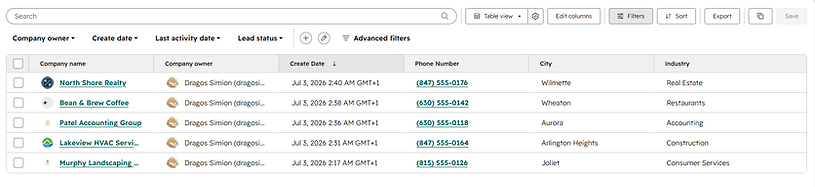
Commercial clients were given a company layer rather than living as standalone contacts — the structure that lets you see revenue across an organisation, and keeps history in place when a contact moves on.
The company layer is the piece B2B implementations most often skip, and it costs them twice. Without it you can't see total revenue or exposure across an organisation, only across individuals — and when a contact changes jobs, the relationship history walks out with them.
A smaller detail worth copying: deals are named consistently by policy type and customer — trivial, until you're scanning 400 deals or making a report legible without opening every record.
Layer 5: Activity logging is what makes the CRM survive turnover
Notes, calls, emails and tasks are logged against the deal record, producing a single timeline per opportunity.

A complete engagement history on a single deal: discovery call notes, a follow-up task, and the quote email, with the associated contact and company pinned to the right. Enough context for anyone to pick the deal up cold.
The standard to aim for: someone who has never spoken to this customer should be able to open the deal and know what to say next.
On one commercial deal here, the timeline carries the discovery call summary (operations, employee count, current programme, no claims in five years), a task to compare carrier pricing before recommending, the quote email with its attachment, and a note explaining the reasoning. Hand that account to a new hire and they lose nothing.
Be honest about the risk, though: activity logging is the first thing to slip, and configuration can't fix it. It's a management habit — which is why the handover documentation ties it to a rhythm: log after every interaction, review open deals weekly.
Layer 6: Build reporting last
The executive dashboard covers four reports: Deal Stage Overview, Revenue Forecast by Stage, Revenue Forecast by Owner, and Closed Revenue by Month.

The executive dashboard — four reports covering pipeline health, forecasting and closed business. Every figure here is only as reliable as the pipeline, properties and associations underneath it.
None are complicated. What makes them trustworthy is everything underneath.
Closed Revenue by Month reads $6,900 across three bound policies — meaningful only because deals move to Policy Bound when a policy is genuinely sold, close dates reflect reality, and Amount is populated everywhere.
That's why reporting comes last. A dashboard built before the data model is settled hard-codes assumptions about fields that are still changing, and breaks the first time someone adds a property or renames a stage.
Common mistakes that cause CRM decay
-
Renaming HubSpot's default stages without documenting the internal IDs left behind
-
Leaving stage probabilities at their defaults, then treating the weighted forecast as real
-
Creating properties that no report, workflow or conversation ever uses
-
Overloading the creation form, which produces guessed data rather than complete data
-
Skipping the company layer on B2B accounts and losing history when contacts move on
-
Building dashboards before the data model is stable
-
Layering automation onto a data model that isn't trustworthy yet — automation makes bad data spread faster
-
Treating go-live as the finish line
What keeps a HubSpot CRM reliable after go-live
The implementation is the easy part. Configuration decays because businesses change: you add a product line, hire a second rep, or discover your process has a step the pipeline doesn't recognise.
The brokerage's roadmap reflects that sequencing deliberately — lead assignment, renewal reminder workflows, email automation and marketing integration are all identified as next steps, positioned after the foundation is stable rather than bundled into launch.
Underneath that sits a maintenance rhythm, and it's less work than people expect:
-
Review the dashboard in weekly sales meetings, so bad data is noticed by people who can correct it
-
Monitor property fill rates and investigate the ones that drop
-
Close inactive opportunities promptly rather than letting the pipeline inflate
-
Re-check stage definitions and probabilities against how the team actually sells, at least quarterly
-
Keep renewal and effective dates current, since they drive future revenue
Questions worth answering before you start
How many custom properties do you actually need? Fewer than you think. This brokerage launched with eight, each mapped to a decision.
Start with what you'd report on or segment by, and add properties when a real question can't be answered — not in anticipation of one.
Should you migrate all your historical data? Migrate what you'll act on. Records you'll never contact, quote or report against add noise and cost trust. Whatever you import, validate it afterwards — validation is a distinct step, not a byproduct of the upload.
Does your HubSpot need rebuilding, or just tuning? Check whether the pipeline still matches how you sell today. If stages describe a process you've outgrown, that's structural. If the structure is sound but the data is patchy, that's a discipline problem — and far cheaper to fix.
The takeaway
A reliable HubSpot CRM isn't the result of more features. It comes from a pipeline that mirrors real work, a data model built around decisions, an entry experience light enough that people use it, associations that hold relationships together, activity history that survives staff changes, and reporting built last on top.
Get that sequence right and HubSpot stays useful as you grow. Get it wrong and you'll be rebuilding within two years — usually when the business can least afford the disruption.
If your HubSpot has drifted from how your business now operates — reports you double-check before sharing, a pipeline that no longer matches your process, properties nobody fills in — that's a solvable problem, and it rarely means starting over.
You can read more about how I help growing businesses keep HubSpot reliable and scalable as they grow here.

